Clipping Path India –more promises to keep in 2013
On this New Year’s Eve, we salute all our customers who have ignited us and kept the fireworks on for the whole year. As we sit on the threshold of 2013, we begin with a new leaf. Our aim to remain motivated and let our experience hold us in good steed. Our team has worked through the year keeping deadlines for several clients. It’s our business to remain ahead of competition.
As the dawn of New Year of 2013 breaks on the horizon
It gives rise to new hope, aspirations and prosperity,
It increases the possibilities of our long liaison,
Happy New Year and compliments of the season
The time for thanksgiving is not yet over. We have more promises to keep in 2013. Our services have been appreciated in the past. As the countdown for another season begins, we have carved a different path each time to bring novelty in our services. Our path is smoothened because of the experienced talent who works hard. May you be able to carve a new path and lead the way for better opportunities for all of us.
As global partners, we are there to lend a helping hand to all your digital photography needs. We can instantly provide samples of e-cards, inspirational messages and other things to send and express your feelings to everyone. Do let us know how we can share our talent in creating better greetings and other photo features to make a worthy and very promising start to 2013.
Say it all with interactive Xmas cards!
Clipping Path India has been able to service its diverse business community armed with a slew of photo editing packages. Cut or manipulate photos, add text or graphic to the snaps, scale the artwork for a website. We do it all and now we open our expertise to add interactive Christmas cards. Should you wish to make a difference to your employees, business associates and family we can add more warmth to the designs. Our graphic artists are trained to produce innovative e-cards. We have a hub in Bangladesh, which has a large team of editors who handle different jobs pertaining to photo editing.
Clipping Path India and its staff wishes Season’s Greetings to you and your staff. We thank you for all the faith reposed in our brand of services. Hopefully we shall continue to be of service as and when the need arises.
Clipping Path India Team
info@clippingpathindia.com
http://www.clippingpathindia.com
There is no Substitute to Pre-media Clipping Path Service
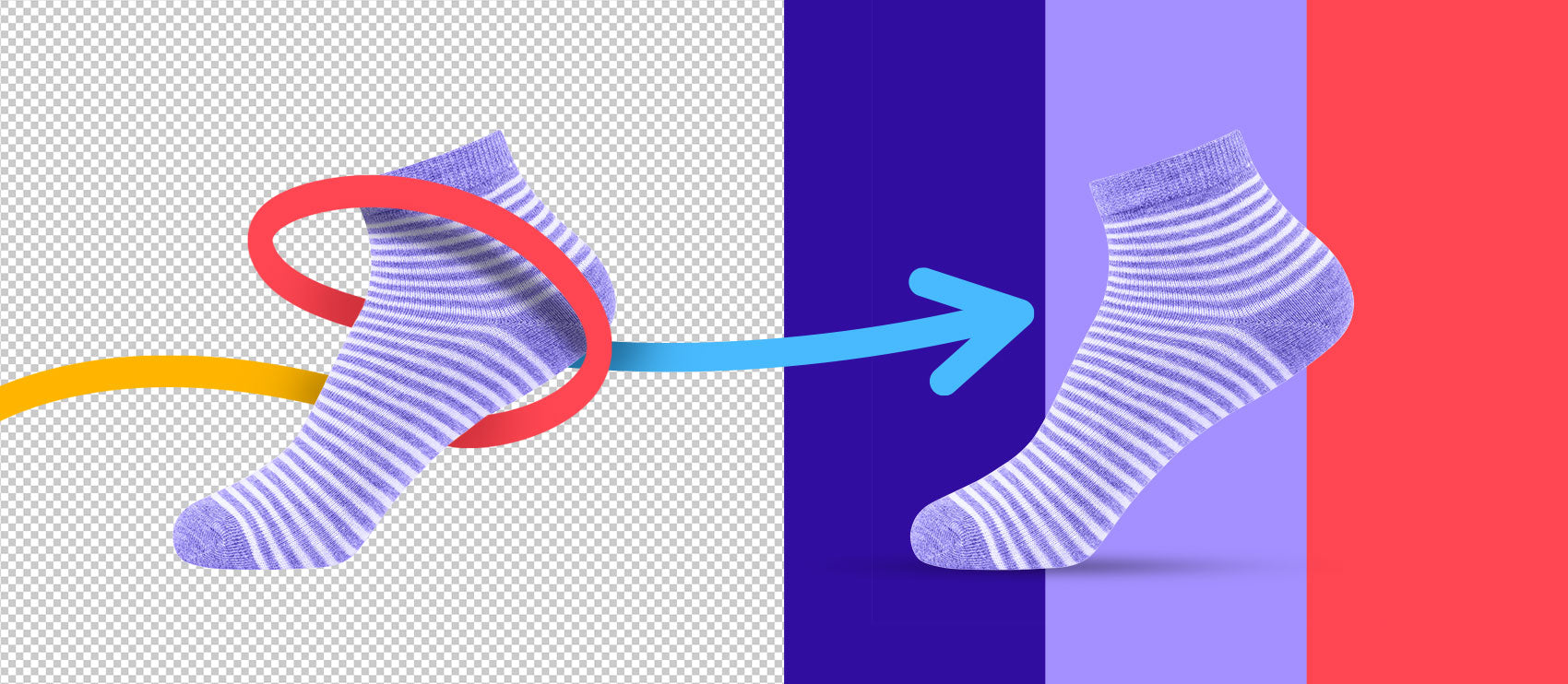
Do you need magical visuals for your company’s website or printed brochures? Enjoy the pre-media clipping path service, from an exclusive photo-processing firm. It is applied in various forms to enhance the pictorial quality in traditional style like print media and digital formats akin to websites. It includes replacement of basic background to complex masking or vector-based routes for photo manipulation. There is no other substitute; the clipping path service is an essential element that makes a photo processing company stands on its own. The use of the latest imaging software is important to help customers with artwork. The final results by professionals are sharp and with perfect edges. There are very few advanced professionals who can remove the unwanted objects from a photo frame without disturbing the original quality. Clipping paths are done accurately when the editor is able to understand the brief and execute the work with precision and on time.
Clipping Path India based in Bangladesh provides these services at fantastic prices for the last several years. The company has experts who use the latest image editing software to produce quality work. Some of the company’s prestigious clients include several prestigious newspapers, publishers, advertising firms and photographers.
Our Related Services:
Image Masking Service
Drop Shadow Service
Mirror Effect
Photoshop Retouching Service
Image Manipulation Service
On the occasion of Eid we wish Allah’s blessings would light your road to happiness
And shower your life with continued success and peaceful times
Eid Mubarak
We have continuous drawn our inspiration from the work that you give us. While we are busy all year round this is the time to acknowledge your worth in our lives. May your life be ever filled with the bright lights and lead to the right direction of success.
Clipping Path India has always been a benefactor of all that is useful to the needs of our patrons. Our offshore studio has been developed on the principles that bring a reputation to the brands and companies we work with. Enjoying our patronage are several customers of many paths and sectors. We have been effectively providing a range of services like clipping path, image manipulation, retouching and also photography. Each season we keep reinventing our creativity to remain in touch with the new trends.
This season we are open day & night for your work. Should you need to connect with your clients with some special messages this festive season do let us know. We have developed several new ways to get your message across. Our experts can combine the inspirational messages with good quality graphic designs. With all these elements we can infuse life into fantastic pictures for web and print media. Why not try to reconnect with a humane way by sending your clients a smart message with a warm heart!
How to Apply Drop Shadow Tool in a Photo
Drop Shadow tool is the most simpler and easy handling tool used in photo editing. It gives a striking look to the object in a photo frame. Try it out with this tutorial.
Drop Shadow is a cool photograph-editing tool. It makes the images look more surreal or three-dimensional. It is very simple to add a shadow to the image using layers and layer styles. It is used to create a shadow, which enhances and adds natural weight to the Photoshop image. A drop shadow can be added to a text, image any other object as the user chooses. Here, this tutorial briefs in creating a shadow for a text. Do not forget to understand the most important structures like, the creation of line, the size of shadow, and the dimensions of shadow for generating a clean effect.
Step 1:
If a photo is selected to perform the drop shadow action place the photo on any background. This makes the photo appear in the layer above the background layer.
Step 2:
Select the layer that holds the photo. Check the layer menu and apply the layer style of choice.
Step 3:
Now go head down, select the effects option and the effect pallet appears. In the effects pallet click the layer style icon.
A layer style dialog box appears. Check the drop shadow box from the styles menu and a list of more options appears. . Even more effects like inner shadow, outer shadow or inner glow can be selected if required.
Step 4: The layer style contains option even to change the structure and quality of the shadow. Select a blend mode from the blend mode drop down menu.
For an example set the blend mode to multiply.
Step 5:
Scroll over the opacity option to find number appear on the check box next to it. As the number increases the opacity of shadow also increases hence transparency decreases.
Step 6:
The angle option changes the lighting effect of the shadow select any color to make it even more appealing.
Step 7:
As the distance option is dragged it changes the position of the shadow.
Step 8:
The spread option can be applied to spread the shadow and more the spread option applied the shadow quality also diminishes.
Step 9:
The size indicates the size of the shadow. Increase the size the shadow gets blurred. All these above options make changes only to the structure of the drop shadow.
Step 10:
To change the quality of the shadow there are contour and anti-aliased option. The contour is basically a curve to show how it fades from drop shadow to transparency. The anti-alias choice mergers the edges of the contour and gives a neat finish.
Step 11:
And finally do not forget to check the “layer knocks out drop shadow” which controls the visibility of drop shadow.
Do not forget to save the work. By changing the color, size and orientation of the shadow the photo gets the complete finish.
A shadow added to a photo gives it a more vibrant effect and give more like a 3-d look.
Created By:
Rokaiya Yeasmin Munni
Senior Graphic Designer and Deputy Manager(SEO) at Outsource Experts Ltd
Drop Shadow | Drop Shadow Tool | Drop Shadow Services
What is Photo Editing?
The most important part of shooting pictures often involves work after they have been shot! Post processing photo editing has become the anthem for many professional photographers. Even after shooting good pictures they need to make them great. This is where photo editing is applied. Under the canopy of this broad term ‘photo editing’ several enhancement can be done to make a picture that has already been shot more valuable and attract. Photo editing is a simple and also a complex process that is performed in a studio with software like Photoshop or GIMP. The software supports many features that are useful in photo editing.
For example, in digital photo editing, one can easily do the following things smartly to make a difference to processed pictures:
- Noise reduction
- White Balance
- Contrast
- Exposure
- Lens correction
- Color adjustments
- Resizing and cropping
- Back ground removal
These are the simple processes done with the software, virtually by every editor.
The complex and advanced techniques include:
- Simple to complex Clipping path techniques
- Portrait corrections
- Drop shadow
- Reflections
- Special Effects
- Adjusting text and visuals
- Photo stitching
- Photo masking and layers
- Manipulation
- Enhancement and Retouching
Photo editing is a beautiful process that removes most blemishes and unwanted objects from digital photos. Now that such photos are used for e-commerce, print media, posters and advertising, making impressive catalogues it has versatile application across industries. To achieve the above work, the photo editing professionals have to use the correct software. There are many kinds of software that have been introduced for professional editors. Regularly new features are added to make the work better. Photo editing software is an essential part of everyday post processing work.
How Reflections are made in Photoshop for Various Media
Reflection shadow can compare with the uniqueness of glass. It generates graphical outcome and gives the illusion of shadows to the resource of illumination. This technique is popular and highly demanded by the advertisement, e-commerce and online stores websites as their emphasis is on making the product look attractive to the customers so that they buy them. It is best achieved by the experienced artists. However, it has a wide usage in the catalogues, magazines, newspapers etc. Various types of software are available in the market for reflection shadow using this technique. To name a few are Adobe Photoshop, Illustrator, Fireworks, CorelDraw, Quark Xpress etc. However, Adobe Photoshop is the most popular one among all.
Let us get some good effects by learning how reflections are made in Photoshop. There are some variations in the technique also. Using it over text is the best way to explain in this tutorial.
Use a text that has a plain white background. Creating the desired effect is best in such a scenario. If the text has a background ensure that it is placed on a white one before the start of work.
Begin by creating the duplicate layer. Drag the objects to the layer icon. Right click on the text layer. This gives the duplicate layer.
So now there is effectively three layers-the white background, the original text and the new duplicate layer. Just in case you wish to have additional effect creates a drop shadow on the original layer. With the right drop shadow the image will now have a softer appearance.
Step up the process by flipping the layer vertically. Use Edit/Transform/Flip Vertical to do the needful. Adjust the reflection by bringing it exactly on the original one.
With the help of opacity make the reflection more authentic. Around 30% opacity is fine. This gives the final result.
This is the basic technique- now for some variations:
Edit/Transform/Perspective-this helps to get a new dimension to the reflection. This is a normal reflection.
One can also create a nice water ripple effect by using Filters/Distort/Ripple.
If a gradient tool is used the result can once again be altered. It gives a vanishing or fading effect.
The reflections can always be made more creative. Once the basics have been mastered, it is easy to experiment. New trails often lead to exciting results. If you try anything new let us know. We would like to share it with others too.
Created By:
Rokaiya Yeasmin Munni
Senior Graphic Designer and Deputy Manager(SEO) at Outsource Experts Ltd
Reflection Shadow | Drop Shadow | Image Shading Services
What is Product Photography?
Exposing a large bunch of products of a company’s flagship brand in a controlled environment has to be done with patience. Shooting digital images from multiple angles with different sources of light and background change is one of the fundamental requirements of e-business today. Sharp and crisp photos sell the products virtually. This is one of the main reasons why product photography is in demand. Earlier there was speculation rife that studio photography really does not do much for product selling. But today different facets have emerged and this is an extended service that photo editing studios are providing. It is amazing how two different parts- pre and post imagery can be done under a large canopy. It can be done without compromising on anything. Rather both the pre production and post imagery processes now complement each other. They enhance the value base of the firms that offer this vital link to e-business ventures.
Product photography is defined as the way to shoot a montage of items by a specialized photo professional. The light and exposure technique first to shoot and then to edit is gaining ground. At the moment few online firms are providing this exclusive service to a select group of clients. It is a still life shooting that brings to life the products. The items to be shot can be small as soap bars or they can be as big as the new model of the latest racing motorbike company. The studio, the backdrop, the technicians and equipment are all involved in the creation.
Yes, there is a special photographer who does this kind of work. Such professionals need the space to execute the perfect shots. Large lighting and well lit product bring out the qualities to sell the product online- Ready to take up the challenge?
A Dynamic Photo Editing Service is the Cornerstone of Good Visuals
Whether it is a basic airbrush or a complex photo restoration, the job of a right photo editing service is to make stunning visuals. Do you need your wedding photos to become more dynamic?
Digital photos look fresh each time they are looked at. Right from small imperfections to complex editing-all is dealt with very artistically. Today a photo editing service has become the cornerstone of good visuals that we see. This is the main reason why people now use it often. An overall editing performance ensures that the dynamism makes it memorable each time. When the personal album or the product inventory pictures are recalled they can always make the owner grin in remembrance of the shoot. With skilled editors, the pictures turn out to be much better. They use their talent to dish out innovative designed pictures. Part of the service also includes complex process of clipping path, vector conversions and making eps files.
The photo editing service is usually done by online studios, which have the infrastructure and software. With trained editors, many things can be done as part of the service. Photo enhancement, background change and photo retouching are common reasons clients wish to edit their inventory. Even though most of these processes are software enabled, it is the aesthetic presentation is what separates a good photo editing from a great one. That is the difference that a seasoned professional brings in. Other basic services include photo restoration, special effects, image cropping, digital coloring shadow and mirror effect. There are other routine jobs that can be done via this service. Many individuals approach studios to retouch the family pictures, wedding photographs and add a fresh perspective to their memories.
There are many types of photo editing that are used. Various techniques are applied in accordance to levels of complexity. A minimal photo restoration may be enough for removing spots and scratches. The type of photo editing service has to be determined depending upon the needs to individual images.
Vector Art – Is It Really Superior Way for Imaging Needs?
Vector art has evolved immensely with times. As digital needs increase in every sector its applications are varied. In contrast to Bitmap, it has various file formats that support its features. Thus making it a superior factor for major imaging needs.
The art of photography has come a long way from the days when it was first devised. At its dawn of its invention, it created waves among artist because it was the most power medium to interpret things and nature most realistically. The leap from graphical to digital images was substantial one to open up new avenues. The two forms of digital images namely Bitmap and Vector images are constantly evolved to suit the changing tastes of the viewers. Often, it is debated that Vector art is superior and its supports the increasingly complex techniques of image editing. But, in reality both the forms of digital images have specific set of benefits and support various applications. And the fact that any Bitmap image can be easily converted into Vector and back makes it easier for the artists to make a more comprehensive use of the same. Enjoy reading a comprehensive study on vector art.
What is vector art?
It is well known that mathematical statements or commands are used to create digital vector images. These mathematical statements and commands are used to place shapes and line in three-dimensional or two-dimensional spaces. These vector statements are saved in the form of a sequence. Images saved in this format can easily be recovered and manipulated. Editing includes changing of the mathematical statements or codes. They are preferred over the bitmap images because in this case the files are much smaller in size.
Vector images and its implication
In sharp contrast to the Bit-map images, which is suitable for natural objects, vector images are largely used for abstract objects. This is one of the merits of vector images that they can easily be scaled without hampering the quality of the data. Thus, abstract objects like company maps, company logos etc, which need constant manipulation, can easily be put into vector format. So, the process of resizing them becomes easier and there is no loss of quality. But there is a limitation to the number of times a vector can be resized. If the process of scaling the images is repeated beyond a permissible limit, then there can be potential loss of quality. While using vector art one must be careful because even minute errors performed during the drawing can become prominent once the images are enlarged. At the same time, the vector lines may not be visible once the images are reduced to great extent.
Application that support vector art
There are a number of applications that support vector art. But it remains choice of the user to make choice on the basis of factors like user’s platform and thee available features. The choice is further depended on whether it will be used for technical use or for artistic use. Some of the common applications that support vector art are Corel Draw and Adobe Illustrator.
File formats used by Vector art
The results are improved to great extent and it easy to manipulate them. But as compared to Bitmap images, in case of Vector images the choice of file storage formats are limited. The two most widely used file formats for this reason are EPS and PDF.
About Author:
Atiqur Sumon
Chief Executive, DTP & SEO Expert at Outsource Experts Ltd.
Vector Art | Vector Images | Art of Photography